
HiNoter - AI Note Taker
Nieruo TeamProductivity
4.776.00 Reviews
- Version
- 4.8.0
- Installs
- 1.00M
- Age Rating
- Everyone
Screenshots
Our Review of HiNoter - AI Note Taker
 Analysis by Appyee
When a useful thought arrives during a conversation, the practical question is whether I can capture it without breaking my focus. HiNoter - AI Note Taker is built for that kind of moment: it turns spoken discussions into written material and helps pull out the points that deserve follow-up. I see the appeal most clearly for people who leave meetings with a recording, a half-finished page of notes, and no easy way to remember what they agreed to do.
That promise also makes the network part of the experience worth thinking about. Transcription and AI processing can involve more than simply saving a note, so I would not plan an important session around assumptions about what works without a connection. My practical approach is to check that the app is ready before the conversation starts, then review the result while I still remember the context. That small routine matters more than any polished summary: a transcript only helps if I can rely on capturing it and then turn it into something usable.
Where a connected note-taking workflow helps—and where it needs care
I find the most useful way to judge a connected note-taking workflow is to separate capture from follow-up: a conversation may be recorded on the spot, while reviewing and acting on its transcript can happen later. That distinction helps me plan around interruptions without assuming the app will work offline. Next, I’d look at the practical habits that make phone-based capture less distracting.
Meetings are the clearest fit, but the connection matters
For a scheduled meeting, I would open the app in advance, check the connection, and make sure I can start recording before everyone begins talking. That avoids the awkward scramble of opening a tool while introductions and decisions are already underway. Afterward, I would use the generated text as a working record, not as a substitute for listening carefully or confirming important details with the people involved.
Connectivity affects more than whether a screen loads. If transcription or summaries take time to appear, a weak connection can interrupt the tidy sequence people expect: record, review, share. I would leave a little breathing room after a call rather than promise colleagues an instant polished recap. For a meeting with high-stakes decisions, I would also keep a brief personal note of names, deadlines, and exact commitments, then compare it against the result.
On the move, small habits make the app easier to use
A phone is convenient for a quick discussion in a shared workspace, a class, or a conversation after an appointment, but mobile use brings distractions. Notifications, background noise, and a low battery can all compete with the task. I would silence interruptions where appropriate, place the phone where it can capture voices clearly, and avoid treating a pocket recording as a dependable substitute for deliberate note-taking.
For a lecture or one-to-one conversation, the most useful workflow may be to record first and sort the material later. Trying to organize folders, add labels, and listen closely at the same time can divide attention. If the app’s processing depends on connectivity, I would wait until I have a reliable connection before expecting summaries or action points to be ready. This is especially sensible when moving between buildings or relying on an inconsistent public network.
Recovery starts with a sensible backup plan
Any recording workflow can go wrong: a call may end unexpectedly, a connection can falter, or the phone may be needed for something else. I would not assume that a recording is safely processed just because I tapped a button. After an important session, I would check that the note has appeared and that its transcript or summary is available before deleting anything or relying on it as the only record.
That check is a simple but valuable habit. If a meeting produces decisions that affect other people, I would send a concise follow-up message in the usual channel rather than trusting an AI-generated action list without review. Names, dates, and negations are easy to mishear in any automated transcript. Reading the result while the conversation is fresh makes corrections faster and reduces the chance of passing along a confident but inaccurate detail.
Use it thoughtfully when conversations are sensitive
Recording a conversation is a matter of trust as well as convenience. I would tell participants when I plan to record and follow the rules that apply in that setting. For confidential work, sensitive personal discussions, or material covered by strict workplace policies, I would first check whether using an AI note-taking app is appropriate. A passcode or encryption claim should not replace that judgment, nor should it be treated as a reason to record people without their awareness.
I would also be selective about what I capture. A meeting that needs a decision log may benefit from a full recording and structured review; a casual exchange may only need a short note typed by hand. Using transcription for every conversation can create more material to review than it saves time. The best outcome is not the largest archive, but a clear record that has a purpose and can be handled responsibly.
Who gets the most from this approach
I think this kind of tool makes the most sense for people who regularly need to turn spoken discussions into follow-up: project coordinators, students reviewing talks, freelancers keeping track of client conversations, or anyone who tends to miss details while trying to write everything down. It is particularly helpful when the hard part is not capturing a sentence but finding the decisions and next steps afterward.
It is less compelling if you rarely attend spoken meetings, prefer handwritten notes, or need a tool that works predictably in places with poor connectivity. It may also be the wrong choice when you need a word-for-word legal or clinical record without human checking. In those situations, a dedicated professional recording process or a simple manual note can be safer. AI-generated text is a convenience, not proof that every speaker or detail has been captured correctly.
How I would fit it into an ordinary day
Imagine starting the morning with a team call, then heading into a class or a client discussion. Before the call, I would make sure the phone has enough battery and a stable connection, start the session deliberately, and keep a short list of any decisions that must be exact. Once the conversation ends, I would scan the transcript for names and commitments, then use the summary or action items as a draft for my follow-up—not as a message to send without reading.
Later, I would file the note in a folder or add a tag that reflects the project, rather than relying on memory to find it weeks from now. A useful search habit is to include distinctive terms in a note title or label when saving it, especially for recurring meetings whose transcripts may use similar language. This reduces the burden on search and makes an archive more practical. The extra few seconds of organization can matter more than generating another summary.
Compared with manual notes and ordinary recorders
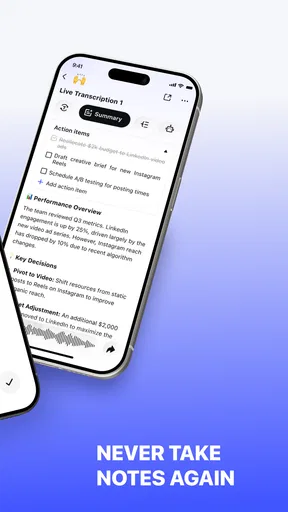
Compared with typing everything during a meeting, transcription can free attention for listening and participating. The trade-off is that manual notes are selective by design: I can write only the decision or insight that matters, while a transcript may leave me with more text to review. A basic voice recorder preserves audio but usually leaves the work of finding key points to me. HiNoter’s appeal is the attempt to bridge that gap by pairing spoken capture with summaries and action items.
That does not make it a replacement for every notes app. A plain text notebook is often faster for a grocery list, a private thought, or a quick reminder, and it does not require turning a conversation into a recording. For meetings where follow-through is the real problem, however, having a transcript and a condensed view can be more useful than a blank page. I would choose the method based on the task, rather than moving every scrap of information into one tool.
What the app offers at a glance
HiNoter is a free productivity app from Nieruo Team, with optional in-app purchases listed from $2.99 to $99.99 per item. Its audience rating is Everyone, and the app has a 4.7 average from around 6,800 ratings, with more than 100,000 installs. It was released on June 30, 2025, and version 3.3.1 requires Android 8.0 or later. Those figures suggest that it has attracted a meaningful audience, though popularity alone cannot tell me whether its transcription fits a particular accent, room, or meeting style.
I would start with the free app and see whether its workflow suits the kinds of conversations I actually have before considering any purchase. The range of optional item prices is broad enough that I would check the in-app details before paying, rather than assume a particular feature is included at a particular tier. The practical question is whether the time saved in reviewing conversations is worth the cost for my own routine.
When deciding whether it is a fit, I would test it first on a low-stakes conversation in a setting where recording is welcome. Check whether the transcript is readable, whether the summary preserves the decisions, and how much editing is needed. That trial tells me more than a feature list because speech quality, accents, overlapping voices, and room noise can change the results. If I routinely have several people speaking at once, I would be especially careful about verifying who said what.
For someone who mainly wants a searchable record of meetings, the combination of capture and AI-generated organization is the central reason to try it. For someone who needs instant notes while offline or cannot risk a recording failing, I would choose a workflow with a dependable manual fallback. In either case, I would not let a summary become the sole source of truth for a deadline or agreement. Treating it as a first draft keeps the convenience while preserving accountability.
Effortless Note-Taking
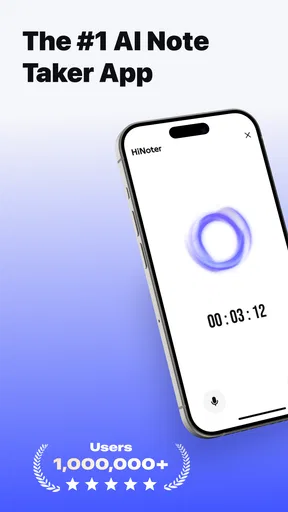
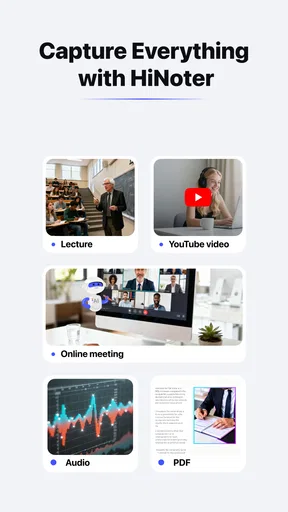
First off, the ease of use is seriously impressive. You just fire up the app, and it’s ready to go. No complicated setup or learning curve, which is great because who has time for that? With its AI capabilities, HiNoter listens in and picks up what’s important, so you don’t have to scribble down every single word in a meeting or lecture.
The app’s voice recognition is pretty spot-on, and it’s smart enough to differentiate between speakers. This is super handy when you’re in a group discussion or a bustling conference. Just hit record, and it automatically organizes notes per speaker. It’s like having a transcript genie!
Organize Like a Pro
Now, I’m not the most organized person, but this app has made me look like one. You can tag notes, create folders, and even set reminders for important tasks. The search feature is super robust, letting you find your notes in a snap. I once searched for a note from months ago, and it pulled it up in seconds.
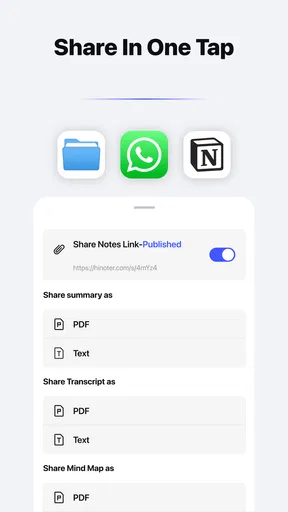
The app integrates seamlessly with other platforms too. Whether you’re a Google Drive fanatic or an Evernote enthusiast, HiNoter has got your back. Syncing is smooth, and you can access your notes from pretty much anywhere, on any device.
Security and Privacy
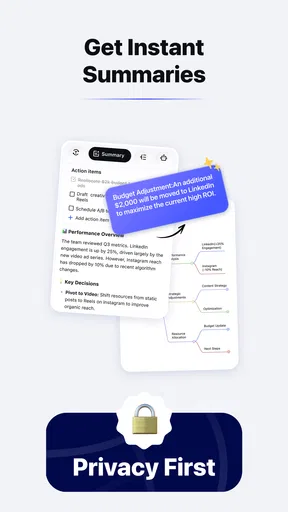
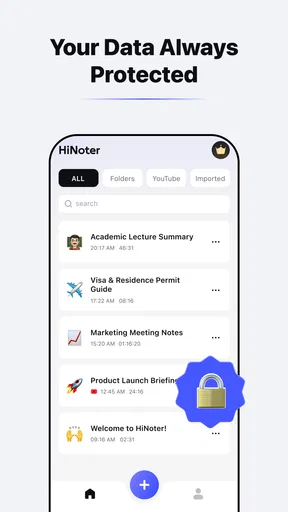
I know what you’re thinking: “But what about my data?” The developers have thought of that too. All your notes are encrypted, which means they’re only for your eyes. Plus, you can set a passcode for extra security. It’s reassuring to know that your thoughts and plans are safely tucked away.
AI-Powered Insights
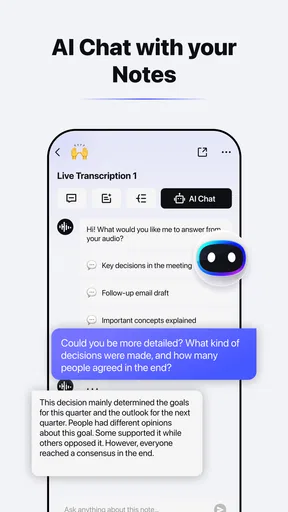
One of the coolest features is the AI insights. The app doesn’t just stop at taking notes; it analyzes them. It highlights key points and even suggests action items. It’s like having a coach whispering in your ear, ensuring you don’t miss out on critical info.
The AI even learns from your habits. Over time, it gets better at predicting the type of notes you’ll need and suggests templates accordingly. It’s a personalized experience that evolves with your needs.
Design and Usability
Let’s talk about the design. The interface is sleek and intuitive. It’s not cluttered with unnecessary features, making navigation a breeze. Everything is where you’d expect it to be, and it just works. The aesthetic is minimalist, which I personally love because it keeps the focus on your notes.
Whether you’re using it on Android or iOS, the experience is consistent. The developers have clearly put a lot of thought into making sure it’s user-friendly across different devices.
Final Thoughts
All in all, HiNoter - AI Note Taker is a fantastic app that’s worth checking out if you juggle a lot of information. It saves time, keeps you organized, and offers peace of mind with its security features. The AI smarts are the cherry on top, making it more than just a note-taking app. It’s like having a personal assistant that fits in your pocket. So, if you’re looking to level up your note-taking game, give it a try. You won’t be disappointed!
Verdict
Strengths of HiNoter - AI Note Taker
- AI-driven note organization enhances productivity.
- Voice-to-text feature is highly accurate.
- Seamless integration with calendar apps.
- User-friendly interface with intuitive design.
- Secure cloud backup for all notes.
Limitations of HiNoter - AI Note Taker
- Limited offline functionality.
- Requires a subscription for premium features.
- Occasional syncing issues reported.
- Lacks advanced text formatting options.
- No native dark mode available.
Similar Picks in This Category
View All
Google Calendar
Google LLC4.6

Google Drive
Google LLC4.3

Google Assistant
Google LLC3.9

Microsoft OneDrive
Microsoft Corporation4.6

Samsung Calendar
Samsung Electronics Co., Ltd.4.1

Microsoft OneNote: Save Notes
Microsoft Corporation4.6
Frequently Asked Questions
What is HiNoter - AI Note Taker?
HiNoter - AI Note Taker is an innovative app designed to help users efficiently capture and organize their notes using AI technology. It offers features like voice-to-text conversion, automatic categorization, and smart reminders, making it an ideal tool for students, professionals, and anyone needing a reliable note-taking solution.
How does the AI technology in HiNoter work?
The AI technology in HiNoter analyzes your input to provide an optimized note-taking experience. It converts spoken words into text, intelligently categorizes notes based on content, and offers suggestions for organizing and prioritizing tasks. This automation saves time and enhances productivity by reducing manual effort.
Is HiNoter compatible with both Android and iOS devices?
Yes, HiNoter is available for both Android and iOS platforms. Users can download the app from the Google Play Store or the Apple App Store. The app is designed to deliver a seamless experience across different devices, ensuring that your notes are always accessible and synchronized.
Does HiNoter offer offline functionality?
HiNoter provides offline functionality to ensure users can take notes even without an internet connection. While certain AI features may require connectivity to function fully, basic note-taking and storage are available offline. This feature is particularly useful for users who frequently operate in areas with limited internet access.
Are my notes secure with HiNoter?
Security is a top priority for HiNoter. The app employs encryption to protect your notes and personal information. Additionally, users can enable password protection or biometric authentication to add an extra layer of security, ensuring that only authorized individuals can access sensitive data.
